# How I moved my blog to Obsidian
I started blogging around 3 years ago, at that time I was using Notion as my main knowledge tracking tool. It was the new kid around the block and I admit it does work pretty well.
As I am a deep believer of ‘less is more’, it was a natural decision to use Notion as my blogging platform as well, and I basically had 5 options:
Get the Notion Pro plan and directly build the website using built in functionality
- ✅ PROS: Quick
- 🛑 CONS: Monthly Fee, Limited customization options
Keep the Notion Free plan and use existing services to turn it into a website There are lots of services to do this like Potion.so and Super.so but basically they all work in the same way
- ✅ PROS: Quick, Nice designs, cheaper
- 🛑 CONS: Monthly Fee, Limited customization options, another dependency in the pipeline
Do something on my own using open-source components
- ✅ PROS: Free, Full customization
- 🛑 CONS: Time consuming
In the end I decided to go with the last option, thinking to start small and improve along the way. I used:
- Notion as my articles Database
- react-notion-x to Render notion into html
- nextjs-notion-starter-kit initial code for the blog server
- Vercel to build, deploy and host the website
With minimal tweaks to the initial designed I obtained this nice ( at least for my standard ) result
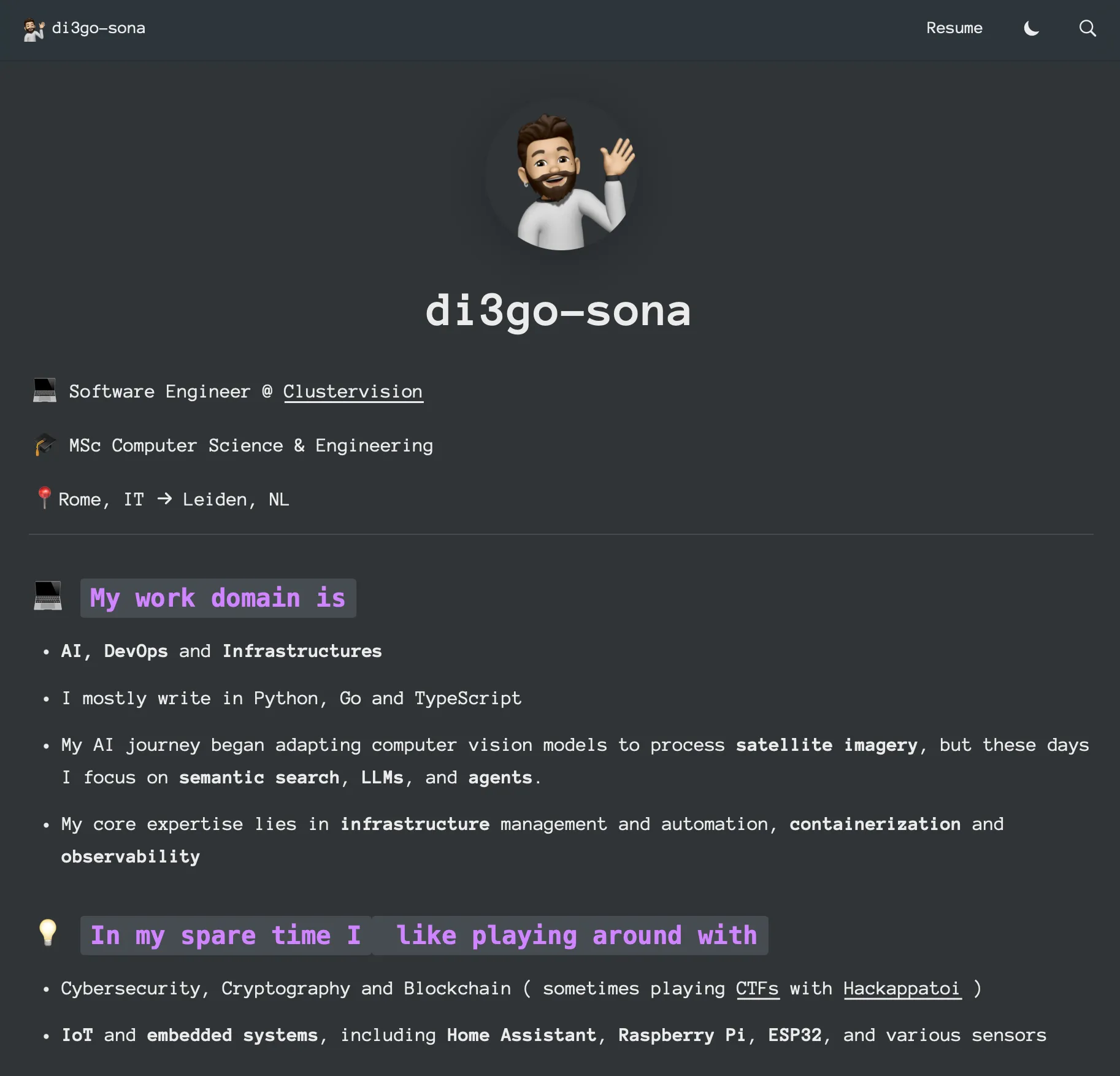
This worked nice for a few years, until recently Notion has been doing many breaking changes and the mantainer of react-notion-x wasn’t catching up with that, I realized a section of my website had just disappeared for a rendering error.
I don’t want to blame the mantainer, actually the opposite, Travis Fisher made an amazing work with this toolkit that served me well for a few years, but unfortunately having to build a software adapting to an ever changing interface can easily become a rabbit hole.
Additionally the loading speed was good but not excellent as pages were re-fetched and rendered every time.
Thirdly I found it very hard to do small changes into the UI as it’s a very complex recursive renderer, in which blocks could contain other blocks, or widgets or inlines
All these limitations made me decide to try and go for another approach. As I am trying to self-host the tools I use, and go for a more minimal and open-source approach for my toolbelt I decided to move fron Notion to Obsidian.
Now given that Obsidian is based on markdown, this allows us to directly use one of the existing markdown renderers that are a lot more sound than the notion ones.
Last time I did a friend website blog I used Hugo, but having to use golang to format html and js code feels quite weird, so this time I decided to go for Astro instead.
I’ve never been a NodeJs fan, but I have to admit that the typescript/react suite for web development it’s just incredibly superior to anything else.
My toolchain this time looks something like this:
- Obisidian as main database for articles
- Astro as renderer from Markdwon to html
- Multiterm as initial code for the blog server
- Cloudflare to build, deploy and host the website
And 75 lines of python code that allows me to move content from obsidian to astro content folder with some links. There were better ways to achieve this for sure, you can use github pipelines, or maybe some notinon plugin, and so on…
But nothing will ever give you the simplicity and customization level that you can achieve with a few lines of python
import reimport osimport shutilimport yaml
OBSIDIAN_VAULT_PATH = "<VAULT_PATH>"ASTRO_CONTENT_PATH = "<BLOG_PATH>/src/content"OBSIDIAN_PAGES_PATH = f"{OBSIDIAN_VAULT_PATH}/Pages"OBSIDIAN_ASSETS_PATH = f"{OBSIDIAN_VAULT_PATH}/Assets"FOLDERS_MAPPING = { f"{OBSIDIAN_PAGES_PATH}/Blog/Articles": f"{ASTRO_CONTENT_PATH}/articles", f"{OBSIDIAN_PAGES_PATH}/Blog/Writeups": f"{ASTRO_CONTENT_PATH}/writeups"}
def list_documents(path): return [f for f in os.listdir(path) if os.path.isfile(os.path.join(path, f))]
if __name__ == "__main__":
for source_folder_path, target_folder_path in FOLDERS_MAPPING.items():
# Remove the target path if it exists if os.path.exists(target_folder_path): shutil.rmtree(target_folder_path)
# Re-create the target path os.makedirs(target_folder_path)
for full_filename in list_documents(source_folder_path): filename, extension = os.path.splitext(full_filename) target_dirname = filename.lower().replace(' ', '-')
source_filepath = \ os.path.join(source_folder_path, full_filename) target_dirpath = \ os.path.join(target_folder_path, target_dirname) target_filepath = \ os.path.join(target_folder_path, target_dirname, 'index.md')
# Create the target file path os.makedirs(target_dirpath)
with open(source_filepath, 'r') as source_file:
file_content = source_file.read()
file_frontmatter_yaml_match = \ re.search(r'^---\n(.*?)\n---', file_content, re.DOTALL) if file_frontmatter_yaml_match: file_frontmatter = \ yaml.safe_load(file_frontmatter_yaml_match.group(1)) new_file_frontmatter = {} new_file_frontmatter['title'] = filename new_file_frontmatter['published'] = \ file_frontmatter['Created'] if 'CTF' in file_frontmatter: new_file_frontmatter['ctf'] = \ file_frontmatter['CTF'] if 'Tags' in file_frontmatter: new_file_frontmatter['tags'] = \ [f.replace('#', '') for f in file_frontmatter['Tags']] if 'tags' in file_frontmatter: new_file_frontmatter['tags'] = \ [f.replace('#', '') for f in file_frontmatter['tags']]
new_file_frontmatter_yaml = \ f"---\n{yaml.dump(new_file_frontmatter)}\n---\n" file_content = \ file_content.replace(file_frontmatter_yaml_match.group(0), new_file_frontmatter_yaml,1)
else: raise ValueError(\ f"Frontmatter not found in {source_filepath}")
attachment_matches = re.finditer( r'[!]\[\[(.*?)([|](.*?))?\]\]', file_content) for attachment_match in attachment_matches: attachment_name = attachment_match.group(1) source_attachment_path = os.path.join( OBSIDIAN_ASSETS_PATH, attachment_name) target_attachment_path = os.path.join( target_dirpath, attachment_name) shutil.copyfile( source_attachment_path, target_attachment_path)
file_content = file_content.replace( attachment_match.group(0), f'' )
with open(target_filepath, 'w') as target_file: target_file.write(file_content)The new result you can see from yourself
I have to admit that I really like it, it’s blazingly fast and fully customizable., let’s hope it will stand the trial of time